
Quote the job. Invoice it. Get paid.
You do the job. Koteshen chases the payment.
Quotes and invoices from your phone, for plumbers, electricians, cleaners and other service businesses.
14 days free, no card. Then keep the Free plan or pick one with reminders.
Just need one invoice? Use the free invoice template.
Whitfield Plumbing & Heating
Water heater replacement for Maria Alvarez
-
Quote accepted
Maria said yes from her phone, Tuesday 9:14 am
-
Invoice sent from the truck
Previewed, then sent with a Pay now button
$1,690.00
-
Reminder sent for you
Three days after the due date, no chasing needed
-
Paid in full
Straight to your Stripe account
An example job
PaidWhere the money gets stuck on a job
The quote sits unanswered
Customers open your quote on their phone and accept it from the same page. On Basic and up you can ask for a deposit, and they pay it the moment they accept.
The invoice goes out days late
Build it on your phone between jobs, check exactly what the customer will see, and send it before you leave the driveway.
Nobody follows up
Every Monday you get a note of who owes you. On Basic and up, reminders also go out 3, 7 and 14 days after the due date and stop once the invoice is paid.
Start the day knowing who to chase
Your home screen leads with the money: late invoices first, then drafts you forgot to send and quotes nobody has answered. Each one has the button you need.
- What you're owed, and how much of it is late
- Send a reminder straight from the list
- Nothing to set up: it fills in as you send invoices


See exactly what your customer gets before you send
The email and the invoice are shown as the customer will see them, and they update as you type. Add a personal note, or send yourself a test first.
- A warning if something is off, like online payments not set up
- Your business name and details at the top of every email
Built for the truck, not the desk
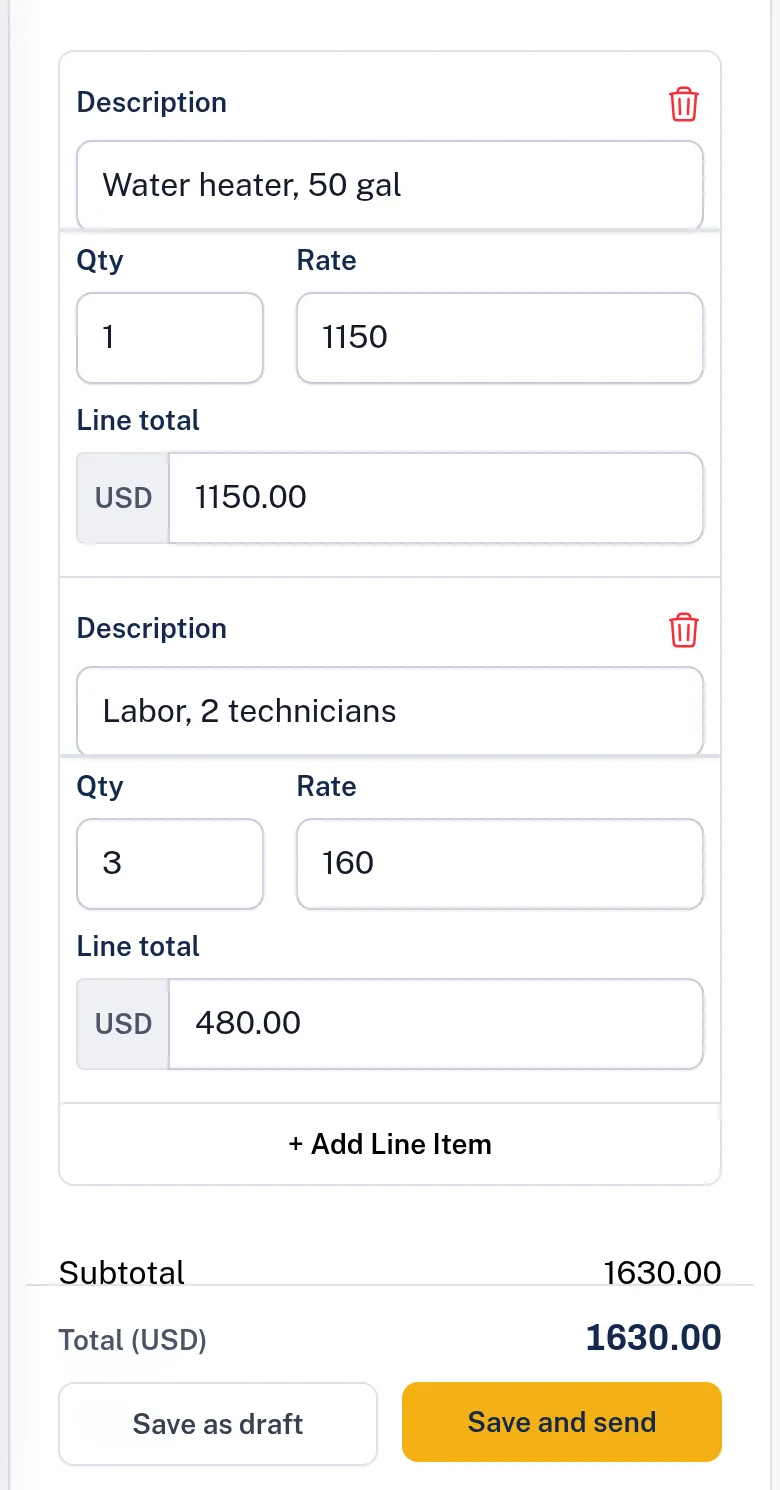
Most invoices are written on a phone. Line items are big cards you can tap, the number pad opens for quantities and prices, and the total and Send button stay on screen.
- Works in the browser, nothing to install
- Items you've billed before are suggested as you type

Customers pay from the link in your email, with no account
They open the link in your email and pay by card. The money goes straight to your own Stripe account. Koteshen never holds it and doesn't take a cut.
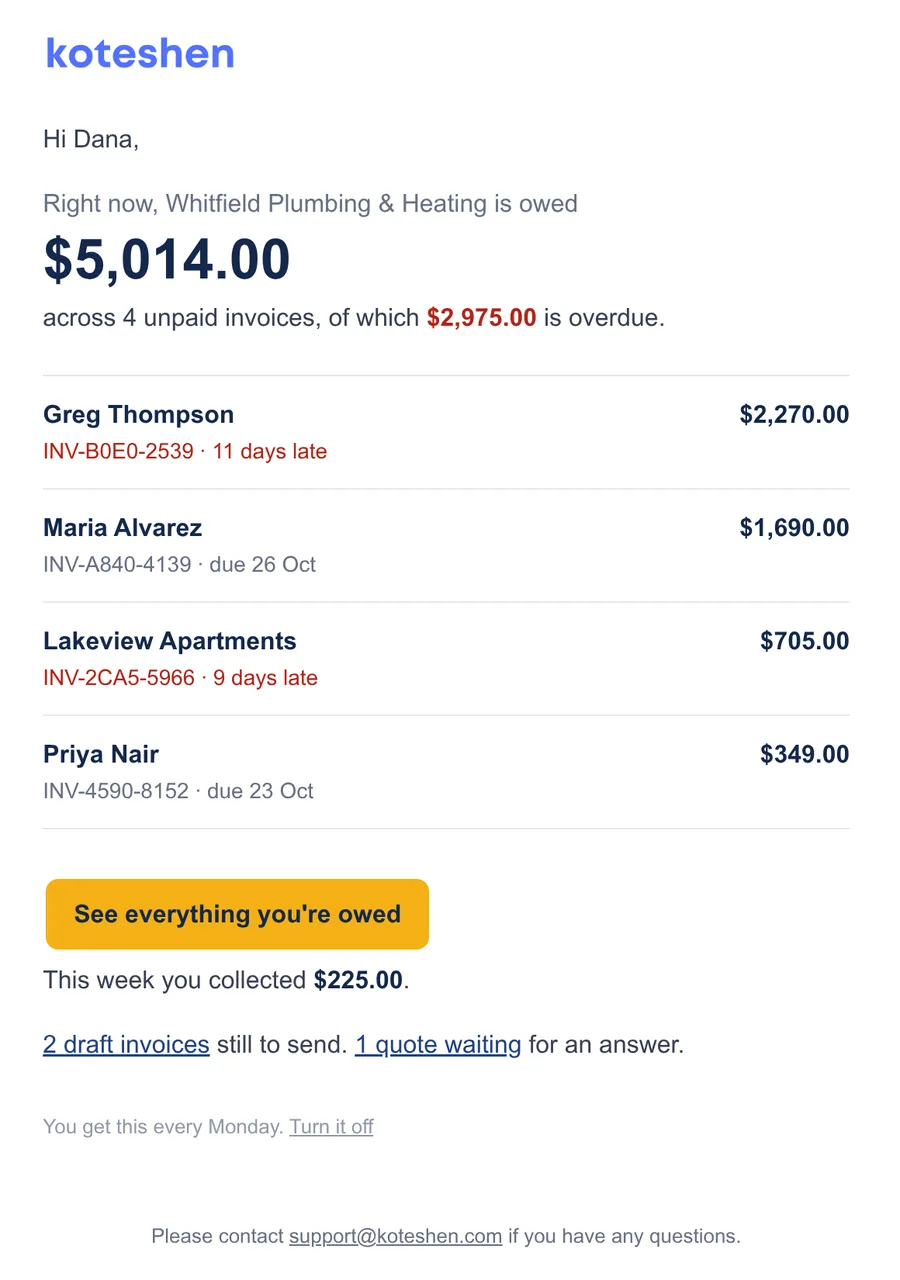
A Monday note of who owes you
Every Monday morning we email you the total you're owed, the biggest unpaid invoices and how late they are, and what you collected last week. It only comes when there's something to say.
And the rest of what you'd expect
- Add sales tax or VAT to any invoice
- Invoices in the currency your customer pays in
- Recurring invoices for service plans and retainers
- Deposits when a customer accepts a quote
- Team members with roles, so the office can bill and the crew can't change settings
- Your business name and details on every invoice, quote and email, and your logo on your documents
- A customer portal with all their invoices in one place
- An API and webhooks, when you want to connect other tools
Some of these come with the paid plans. The pricing below shows which.
Try Basic free for 14 days, then keep what you need
Every new account starts with 14 days of Basic and no card. When the trial ends you keep the Free plan, and your invoices stay where they are. Pick a paid plan whenever you need more.
Free
Try it on a few jobs a month.
$0 a month
- 3 invoices and 3 quotes a month
- Up to 5 customers
Includes:
- Online payments through your Stripe account
- PDF invoices and quotes
Starter
For one person billing a handful of jobs a month.
$10 a month
- 10 invoices and 10 quotes a month
- Up to 10 customers
Everything in Free, plus:
- Team members
Your trial starts here
Basic
For crews that want reminders and deposits handled for them.
$24 a month
- 500 invoices and 500 quotes a month
- Up to 100 customers
Everything in Starter, plus:
- Automatic payment reminders
- Recurring invoices
- Deposits on quotes and part payments
- Send invoices automatically
- Send quotes automatically
- Customer portal
- and 10 more
Ultimate
For busy shops that bill a lot and connect other tools.
$35 a month
- Unlimited invoices and quotes
- Unlimited customers
Everything in Basic, plus:
- Zapier
Prices are in US dollars. Cancel any time from your billing settings.
Questions people ask first
Do I need a card to start?
No. You get 14 days of Basic with every Basic feature switched on. If you do nothing after that, you move to the Free plan.
How do my customers pay me?
You connect your own Stripe account and your invoices get a Pay now button. The money goes straight to your Stripe account. Koteshen doesn't hold it or take a percentage, though Stripe's own fees apply.
Do my customers need an account?
No. They open the link in your email, look at the quote or invoice, and accept or pay.
Can I use it from my phone?
Yes. It works in your phone's browser, and the invoice and quote forms are built for small screens. There's nothing to install.
What happens to my invoices if I stay on the Free plan?
They stay. The Free plan has lower monthly limits on new invoices and quotes, and on how many customers you can keep, and you can upgrade whenever you need more.
Does it handle sales tax?
You can add the tax rates you charge and set a default. Each invoice shows the tax it adds. Koteshen doesn't file or remit tax for you.
Can I cancel any time?
Yes, from your billing settings. You move to the Free plan and keep your data.
I just need one invoice. Do I have to sign up?
No. The free invoice template makes a PDF with no account. Invoices made there are deleted 30 days after you last open them.
Send your first quote or invoice today
Try everything free for 14 days. No card, and no lockout when it ends.